Recording SUD and VoC in EMDR Timer
By Dr Richard Pomfret, counselling psychologist and EMDR practitioner. Updated 13 October 2026.
EMDR Timer keeps SUD and VoC as two separate, optional ratings. Record the values you take in your clinical work, see them beside the relevant set and carry them into your session log.
What do SUD and VoC mean?
- SUD: Subjective Units of Disturbance
- A self-report of disturbance, from 0 for no disturbance to 10 for the greatest disturbance imaginable.
- VoC: Validity of Cognition
- How true the positive belief feels, from 1 for completely false to 7 for completely true.
These definitions follow EMDRIA's Language of EMDR glossary. The scales measure different things, so the app keeps them separate.
Where do the ratings go?
There are two places to enter them. The optional session target holds baseline SUD and VoC. After ending a set, the set card offers both scales so a rating can stay beside that set's duration and note.
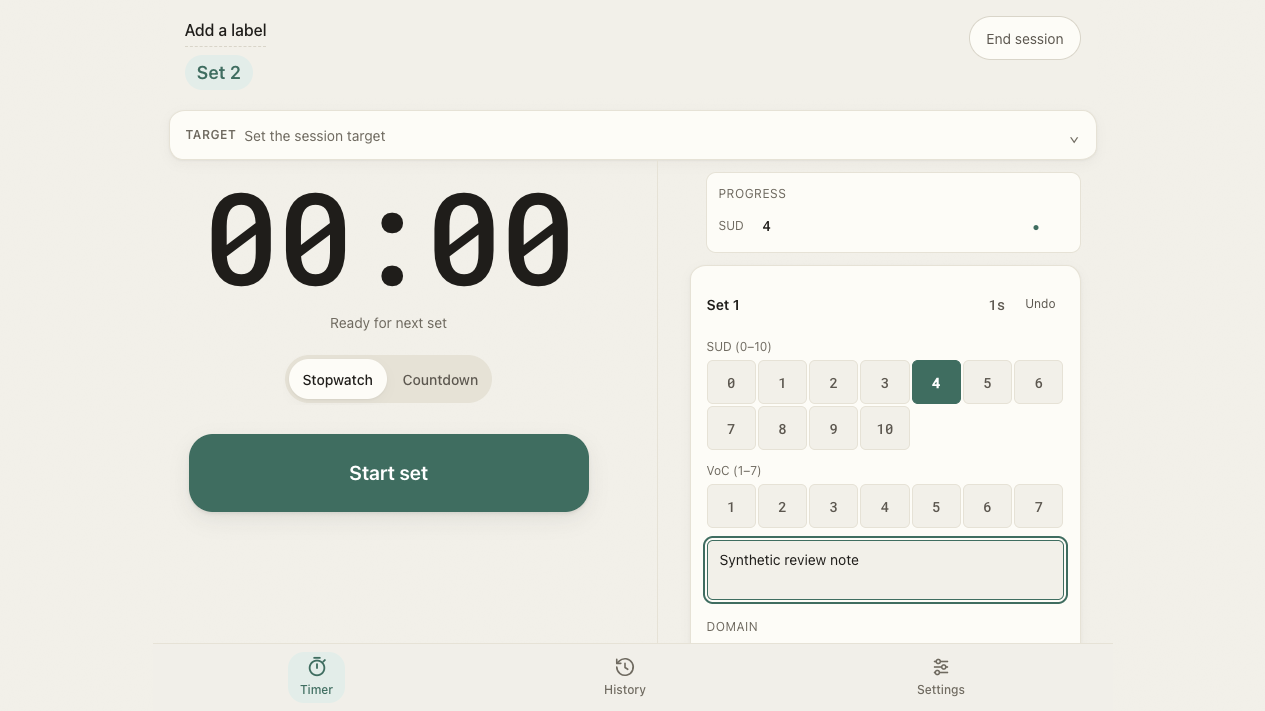
- For a baseline, open Set the session target and enter the ratings you took.
- For a later rating, end the set and select the reported value on its SUD or VoC scale.
- Leave a scale unset when you did not take that rating. Neither field is required to start the next set.
- Review the values in the session summary or History, then export the log if you need it in your clinical record.
Do I need a rating after every set?
The app does not require one. Follow the protocol you are trained in and use your clinical judgement about assessment and reassessment. The timer records your decisions; its buttons do not establish a schedule for asking a client for a number.
VoC can be recorded during assessment as well as revisited during installation. EMDRIA's overview of the eight phases places both scales in the assessment process. This page explains the recording controls rather than teaching that process.
What does the progress display tell me?
When ratings have been recorded, the progress display summarises their movement. It is a view of entered values, not an assessment of readiness, safety or treatment success. An unrecorded value remains absent rather than being filled in.
If you prefer a plainer screen, switch off Progress trend in Settings under Session extras. The SUD and VoC controls remain available.
Taking the ratings into your record
The copied summary keeps ratings with the set notes. If you enable Extra export formats, CSV gives you separate SUD and VoC columns for each set. The session log example and free template shows the difference between a recorded rating and a blank.
Your session data stays encrypted on the device while stored in the timer. Handle exported ratings and notes through your usual record-keeping arrangements. See the privacy page for what the site and app collect.